Temporal Plurality
Time as Material
Note: This tutorial is a work in progress. More cards, examples and demos will be updated soon.
The first three tutorials in this series taught you what data is, how it transforms, and how it becomes geometry. Every example ran continuously: nodes processed samples, buffers cycled, the engine drove everything at its own rate. You declared structure and the system ran it.
This tutorial takes that question back. Not by overriding the engine, but by choosing precisely when your code runs, for how long, under what conditions, and in response to what. The mechanisms range from a single callback attached to a node that was already computing, to a coroutine you write from scratch that suspends and resumes at sample-accurate positions in time. Between those two ends is everything you need to make computation temporal rather than just continuous.
The eight cards that follow move from the simplest attachment (a callback on an existing node's tick) through increasingly direct control, ending at the raw coroutine infrastructure that everything else is built from. By the end, none of the earlier cards will be opaque: you will know what runs underneath `schedule_metro`, `EventChain`, `line`, `Trigger`, and `Fabric`, because you will have written equivalents yourself.
Card 1: Declare Once vs. Control
Click this card to reveal full explanation
Tutorial: Metro
void compose() {
    auto window = MayaFlux::create_window({ "Time", 1200, 800 });
    auto points = vega.PointCollectionNode() | Graphics;
    auto buffer = vega.GeometryBuffer(points) | Graphics;
    buffer->setup_rendering({ .target_window = window });
    window->show();

    auto& angle       = make_persistent(0.0f);
    auto& point_count = make_persistent(0U);

    MayaFlux::schedule_metro(0.016, [points, &angle, &point_count]() {
        float spiral_offset = 0.25f * point_count;
        float r = 0.6f + 0.3f * std::sin((angle + spiral_offset) * 0.4f);
        float x = r * std::cos(angle + spiral_offset);
        float y = r * std::sin(angle + spiral_offset);
        float hue = (angle + spiral_offset) / (2.0f * M_PI);
        glm::vec3 color(
            std::abs(std::sin(hue * 3.14f)),
            std::abs(std::sin(hue * 3.14f + 2.09f)),
            std::abs(std::sin(hue * 3.14f + 4.19f)));
        points->add_point({ glm::vec3(x, y, 0.0f), color, 6.0f });
        angle += 0.18f;
        ++point_count;
    });
}
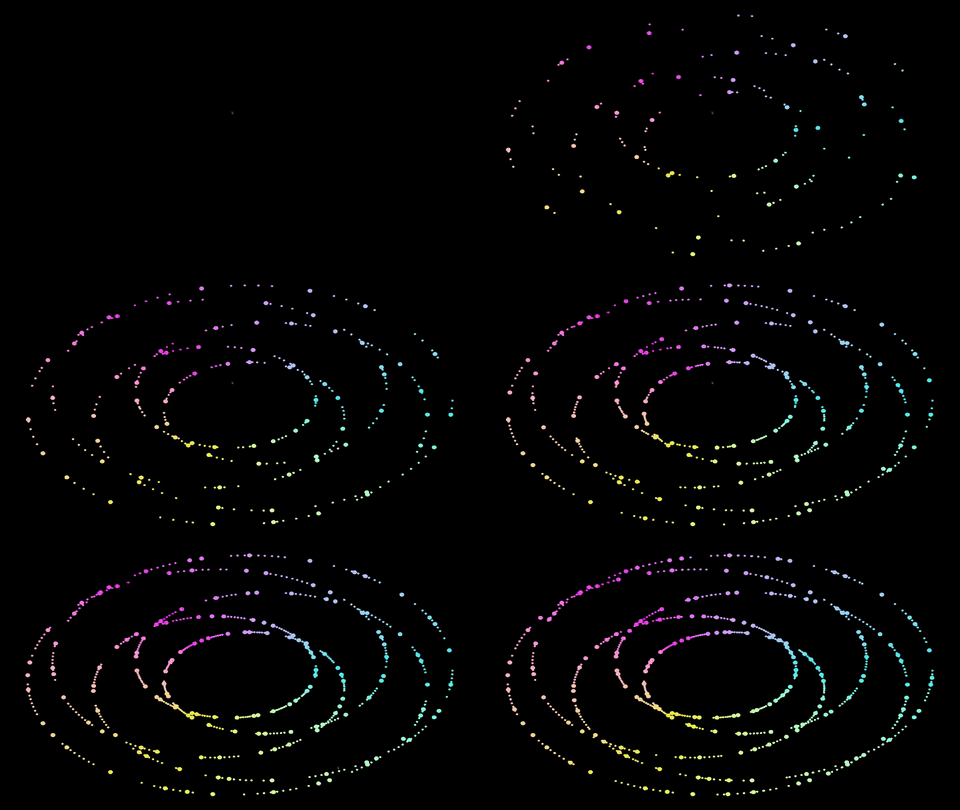
Run this. A spiral of colored points grows across the window at a fixed pace. One point every 16ms, regardless of anything else in the system. The rate is a wall-time promise measured in samples internally, but from the outside it behaves like a fixed interval.
Tutorial: Impulse node with on_impulse
void compose() {
    auto window = MayaFlux::create_window({ "Time", 1200, 800 });
    auto points = vega.PointCollectionNode() | Graphics;
    auto buffer = vega.GeometryBuffer(points) | Graphics;
    buffer->setup_rendering({ .target_window = window });
    window->show();

    auto clock    = vega.Impulse(2.0f) | Graphics;
    auto rate_mod = vega.Sine(0.1f) | Graphics;
    clock->set_frequency_modulator(rate_mod);

    auto& angle = make_persistent(0.0f);
    auto& count = make_persistent(0U);

    clock->on_impulse([points, clock, &angle, &count](const Nodes::NodeContext& ctx) {
        float r = 0.6f + 0.3f * std::sin(angle * 0.4f);
        float x = r * std::cos(angle);
        float y = r * std::sin(angle);
        float hue = angle / (2.0f * M_PI);
        glm::vec3 color(
            std::abs(std::sin(hue * 3.14f)),
            std::abs(std::sin(hue * 3.14f + 2.09f)),
            std::abs(std::sin(hue * 3.14f + 4.19f)));
        points->add_point({ glm::vec3(x, y, 0.0f), color, 6.0f });
        angle += 0.18f;

        ++count;
        if (count == 200) {
            clock->set_frequency(6.0f);
        }
    });
}
Run this. The same spiral grows, but the pace breathes. It slows down, speeds up, slows again.
After 200 points the frequency jumps from 2 Hz to 6 Hz and stays there, triple the original rate,
with no teardown and no new callback. The clock capture lets the callback reach back
into the node that fired it and change its own future rate on the fly.
Change 0.1f to 0.5f on the Sine. The breathing is faster and more dramatic.
Change the Impulse base frequency from 2.0f to 6.0f. More points, still
breathing. The modulator and the base rate are independent parameters, both live, both modifiable
without touching the callback.

Card 2: Control as Side Effect
Click this card to reveal full explanation
Important: Quick explaination of timing models
void compose() {
    auto sine = vega.Sine(2.0f) | Audio[0];

    sine->on_tick([](auto& ctx) {
        // fires 48000 times per second
        // (void)ctx;
        std::cout << ctx.value << " at audio rate\n";
    });

    auto point_node = vega.PointNode() | Graphics;

    point_node->on_tick([](auto& ctx) {
        // fires 60 times per second
        // (void)ctx;
        std::cout << ctx.value << " at graphics rate\n";
    });
}
The Audio node ticks at sample rate. The Graphics node ticks at frame rate. Same method, two orders
of magnitude apart in frequency. | Audio[0] and | Graphics do not just
register the node with different subsystems; they determine the entire temporal contract of every
hook attached to that node. on_tick on a Graphics node is frame-rate code.
on_tick on an Audio node is DSP-rate code. Putting expensive work into an audio-rate
on_tick stalls the audio thread. This is why on_impulse,
on_count, and on_increment exist: they give you audio-rate precision
with call frequency you can reason about.
The previous example with the metro and on_impulse did not explore the side effects of time.
For metro, there is none as time is fixed. But for nodes, while on_tick itself does not beyond
rate of the backend/subsystem responsible for ticking, on_impulse and similar hooks are dependent on the logic of the signal.
For instance, the impulse rate is not constant if it were frequency modulated. Or if the node in question were inherently dependent on other signals,
input sources, non deterministic logic, or any other factor that could affect the timing of the used hook callback.
Tutorial: Counter driving a path
void compose() {
    auto window = MayaFlux::create_window({ "Time", 1200, 800 });
    window->show();

    auto path = vega.PathGeneratorNode(
        Kinesis::InterpolationMode::CATMULL_ROM, 32, 128
    ) | Graphics;
    path->set_path_color(glm::vec3(0.4f, 0.8f, 1.0f));
    path->set_path_thickness(2.0f);

    auto buffer = vega.GeometryBuffer(path) | Graphics;
    buffer->setup_rendering({ .target_window = window });

    auto clock = vega.Impulse(0.5f);
    clock->set_frequency_modulator(vega.Sine(0.08f));

    auto counter = vega.Counter(64) | Audio[0];
    counter->set_reset_trigger(clock);

    counter->on_increment([path](auto& ctx) {
        float t     = static_cast<float>(ctx.phase);
        float angle = t * 2.0f * M_PI / 64.0f;
        float r     = 0.3f + 0.5f * std::sin(t * 0.4f);
        glm::vec3 pos(r * std::cos(angle), r * std::sin(angle), 0.0f);
        path->add_control_point({ pos, glm::vec3(1.0f - t / 64.0f, t / 64.0f, 0.6f), 2.0f });
    });

    counter->on_wrap([path](auto&) {
        path->set_path_color(glm::vec3(
            get_uniform_random(0.3f, 1.0f),
            get_uniform_random(0.3f, 1.0f),
            get_uniform_random(0.3f, 1.0f)
        ));
    });
}
Run this. A curved path grows across the window, tracing a slowly shifting orbit. The
PathGeneratorNode ring holds 128 points; old ones age out as new ones arrive.
On each wrap the color randomizes - a structural moment with no geometry destroyed.
The Impulse and its Sine modulator need no domain registration - they are processed because
the Counter registers the Impulse as its reset trigger, and the Impulse registers the Sine
as its frequency modulator. Only the Counter needs | Audio[0].
on_increment fires once per counter tick. on_wrap fires exactly once
at the modulo boundary. Neither is audio-rate in practice: the Impulse fires at 0.5Hz modulated,
so on_increment fires at that rate regardless of the 48000Hz substrate underneath.
Example: Counter with on_count for structural moments
void compose() {
    auto window = MayaFlux::create_window({ "Time", 1200, 800 });
    window->show();

    auto path = vega.PathGeneratorNode(
        Kinesis::InterpolationMode::CATMULL_ROM, 32, 128
    ) | Graphics;
    path->set_path_color(glm::vec3(1.0f, 0.5f, 0.2f));
    path->set_path_thickness(2.5f);

    auto buffer = vega.GeometryBuffer(path) | Graphics;
    buffer->setup_rendering({ .target_window = window });

    auto clock   = vega.Impulse(0.5f);
    auto counter = vega.Counter(32) | Audio[0];
    counter->set_reset_trigger(clock);

    counter->on_increment([path](auto& ctx) {
        float t     = static_cast<float>(ctx.phase);
        float angle = t * 2.0f * M_PI / 32.0f;
        float r     = 0.5f + 0.2f * std::cos(t * 1.3f);
        path->add_control_point({
            glm::vec3(r * std::cos(angle), r * std::sin(angle), 0.0f),
            glm::vec3(0.9f, 0.5f, 0.2f),
            2.0f
        });
    });

    counter->on_count(8,  [path](auto&) { path->set_path_color(glm::vec3(0.2f, 0.9f, 0.5f)); });
    counter->on_count(16, [path](auto&) { path->set_path_color(glm::vec3(0.5f, 0.2f, 0.9f)); });
    counter->on_count(24, [path](auto&) { path->set_path_color(glm::vec3(0.9f, 0.2f, 0.2f)); });

    counter->on_wrap([path](auto&) {
        path->set_path_color(glm::vec3(1.0f, 0.5f, 0.2f));
    });
}
The path grows in four color phases: orange through 8 steps, then green, then purple, then red, then wraps and resets the color. Change the Impulse frequency and the phase structure stays identical - only the wall-time duration of each phase changes. Sequence structure is decoupled from speed.
Example: Temporal Logic as a gate
void compose() {
    auto window = MayaFlux::create_window({ "Time", 1200, 800 });
    window->show();

    auto path = vega.PathGeneratorNode(
        Kinesis::InterpolationMode::CATMULL_ROM, 20, 256
    ) | Graphics;
    auto gbuf = vega.GeometryBuffer(path) | Graphics;
    gbuf->setup_rendering({ .target_window = window });

    auto lfo = vega.Sine(0.3f) | Audio[0];

    auto gate = vega.Logic(
        [](double input, double elapsed) -> bool {
            double wn = std::fmod(elapsed, 6.0);
            return wn > 1.0 && wn < 4.0;
        }
    ) | Audio[1];
    gate->set_input_node(lfo);

    auto& n     = make_persistent(0U);
    auto& x_pos = make_persistent(-0.8f);

    gate->while_true([&n, path, lfo, &x_pos](auto&) {
        if (++n % 800 != 0) return;
        float v = static_cast<float>(lfo->get_last_output());
        float x = std::fmod(static_cast<float>(n) / 800.0f, 533.0f) / 533.0f * 1.6f - 0.8f;
        path->add_control_point({
            .position  = glm::vec3((x * x_pos) + get_uniform_random(-0.05f, 0.5f),
                                    v * 0.6f + get_uniform_random(-0.05f, 0.05f), 0.0f),
            .color     = glm::vec3(0.9f, get_exponential_random(), 0.5f + 0.4f * std::abs(v)),
            .thickness = (float)get_uniform_random(0.02f, 1.6f)
        });
        x_pos += 0.006f;
    });

    gate->on_change_to(false, [path, &n, &x_pos](auto&) {
        auto pts = path->get_control_points();
        for (auto& pt : pts) {
            pt.color = glm::vec3(
                get_uniform_random(0.3f, 1.0f),
                get_uniform_random(0.3f, 1.0f),
                get_uniform_random(0.3f, 1.0f));
        }
        path->set_control_points(pts);
        n     = 0;
        x_pos = -0.8f;
    });
}
For the first second of every six nothing draws. From second 1 to 4 the gate opens and the path accumulates. At second 4 the gate closes: existing points are recolored in place and cursors reset. The LFO is not the criterion - elapsed time is. The signal is only the material being drawn.
gate needs | Audio[1] because Logic is a Generator the scheduler
owns independently. It pulls its source via set_input_node.
The elapsed parameter is m_temporal_time, which increments by
1.0 / sample_rate on every sample - sample-counted elapsed time, not wall-clock.

Card 3: Tiered Control
Click this card to reveal full explanation
Tutorial: Sequence
void compose() {
    auto window = MayaFlux::create_window({ "Time", 1200, 800 });

    auto particles = vega.ParticleNetwork(
        300,
        glm::vec3(-1.5f, -1.5f, -0.5f),
        glm::vec3(1.5f, 1.5f, 0.5f),
        Kinesis::SpatialDistribution::RANDOM_VOLUME
    ) | Graphics;

    auto* physics = particles->create_operator<PhysicsOperator>();
    physics->set_drag(0.01f);
    physics->set_bounds_mode(PhysicsOperator::BoundsMode::BOUNCE);

    auto buffer = vega.NetworkGeometryBuffer(particles) | Graphics;
    buffer->setup_rendering({ .target_window = window });
    window->show();

    MayaFlux::schedule_sequence({
        { 0.0, [physics]() {
            physics->set_turbulence_strength(0.8f);
        }},
        { 2.0, [physics]() {
            physics->set_turbulence_strength(0.0f);
            physics->enable_spatial_interactions(true);
            physics->set_interaction_radius(0.4f);
            physics->set_spring_stiffness(0.6f);
        }},
        { 2.5, [physics]() {
            physics->set_repulsion_strength(2.0f);
            physics->set_interaction_radius(0.2f);
        }},
        { 2.0, [physics]() {
            physics->enable_spatial_interactions(false);
            physics->set_drag(0.08f);
        }},
        { 2.0, [physics]() {
            physics->set_drag(0.01f);
            physics->set_turbulence_strength(0.4f);
        }},
    });
}
Run this. Particles start in chaotic turbulence, then settle as spatial interactions switch on and spring forces pull them into loose clusters. Repulsion tightens, clusters compress. Interactions cut and drag bleeds off momentum. Then turbulence returns at half strength and the arc ends.
The sequence is a vector of (delay, callback) pairs. Each delay is the interval
after the previous event. Cumulative time: 0 + 2.0 + 2.5 + 2.0 + 2.0 = 8.5 seconds total.
Tutorial: EventChain
void compose() {
    auto window = MayaFlux::create_window({ "Time", 1200, 800 });

    auto particles = vega.ParticleNetwork(
        300,
        glm::vec3(-1.5f, -1.5f, -0.5f),
        glm::vec3(1.5f, 1.5f, 0.5f),
        Kinesis::SpatialDistribution::RANDOM_VOLUME
    ) | Graphics;

    auto* physics = particles->create_operator<PhysicsOperator>();
    physics->set_drag(0.01f);
    physics->set_bounds_mode(PhysicsOperator::BoundsMode::BOUNCE);

    auto buffer = vega.NetworkGeometryBuffer(particles) | Graphics;
    buffer->setup_rendering({ .target_window = window });
    window->show();

    Kriya::EventChain chain(*MayaFlux::get_scheduler());

    chain.then([physics]() {
             physics->set_turbulence_strength(0.8f);
         })
         .then([physics]() {
             physics->set_turbulence_strength(0.0f);
             physics->enable_spatial_interactions(true);
             physics->set_interaction_radius(0.4f);
             physics->set_spring_stiffness(0.6f);
         }, 2.0)
         .then([physics]() {
             physics->set_repulsion_strength(2.0f);
             physics->set_interaction_radius(0.2f);
         }, 2.5)
         .then([physics]() {
             physics->enable_spatial_interactions(false);
             physics->set_drag(0.08f);
         }, 2.0)
         .then([physics]() {
             physics->set_drag(0.01f);
             physics->set_turbulence_strength(0.4f);
         }, 2.0)
         .start();
}
Run this. The same arc as the sequence above, same timing, same result.
The structural difference is readability and composability. EventChain is a
builder: each .then() returns the same chain, so you can read the choreography
top to bottom. For short sequences the difference is minor; for longer choreographies with
repetition or a completion callback, the chain's additional methods become significant.
Example: EventChain with repetition and completion
void compose() {
    auto window = MayaFlux::create_window({ "Time", 1200, 800 });

    auto particles = vega.ParticleNetwork(
        300,
        glm::vec3(-1.5f, -1.5f, -0.5f),
        glm::vec3(1.5f, 1.5f, 0.5f),
        Kinesis::SpatialDistribution::RANDOM_VOLUME
    ) | Graphics;

    auto* physics = particles->create_operator<PhysicsOperator>();
    physics->set_drag(0.02f);
    physics->set_bounds_mode(PhysicsOperator::BoundsMode::WRAP);

    auto buffer = vega.NetworkGeometryBuffer(particles) | Graphics;
    buffer->setup_rendering({ .target_window = window });
    window->show();

    Kriya::EventChain chain(*MayaFlux::get_scheduler());

    chain.then([physics]() {
             physics->set_attraction_point(glm::vec3(
                 get_uniform_random(-0.8f, 0.8f),
                 get_uniform_random(-0.8f, 0.8f),
                 0.0f
             ));
         }, 1.2)
         .repeat(3)
         .then([physics]() {
             physics->clear_attraction_point();
             physics->set_turbulence_strength(0.6f);
         }, 1.5)
         .on_complete([physics]() {
             physics->set_turbulence_strength(0.0f);
             physics->set_drag(0.02f);
         })
         .times(3)
         .start();
}
The attraction point jumps to four random positions 1.2 seconds apart, pulling the cloud
toward each in sequence. Then attraction clears and turbulence scatters everything. That
full arc runs 3 times. After the third pass on_complete cuts the turbulence
and resets drag.
.repeat(3) appends 3 more copies of the first event: 1 + 3 = 4 attraction
moves total. .times(3) runs the whole list 3 times from the start.
Card 4: ONLYWHENs
Click this card to reveal full explanation
Tutorial: TimedAction : bracketed state
void compose() {
    const std::vector<float> freqs = { 220.0f, 277.0f, 330.0f, 370.0f, 440.0f, 554.0f, 660.0f };

    std::vector<std::shared_ptr<Sine>> sines;
    for (auto f : freqs) {
        auto s = vega.Sine(f) | Audio[0];
        s->set_amplitude(0.08);
        sines.push_back(s);
    }

    auto action = std::make_shared<Kriya::TimedAction>(*get_scheduler());
    store(action);

    auto clock = vega.Impulse(0.15f) | Audio[0];
    clock->on_impulse([sines, freqs, action](const Nodes::NodeContext&) {
        action->execute(
            [sines]() {
                for (auto& s : sines)
                    s->set_frequency(220.0f);
            },
            [sines, freqs]() {
                for (int i = 0; i < (int)sines.size(); ++i)
                    sines[i]->set_frequency(freqs[i]);
            },
            get_uniform_random(0.5, 2.0)
        );
    });
}
Seven sines tuned to a major seventh chord run continuously. Every ~6.5 seconds the Impulse
fires and the chord collapses: all voices snap to 220Hz. After a random 0.5 to 2 second
window they restore to their original frequencies. The collapse and restore are
sample-accurate. Rapid impulses do not stack brackets; a new execute call
cancels the pending restore and restarts the duration from the new trigger point.
Try: change the Impulse to 0.08f and the duration to
get_uniform_random(4.0, 8.0). The bracket now outlasts the impulse period.
The next impulse fires while still collapsed, restarting from unison again. The chord
barely has time to breathe before the next collapse.
Tutorial: >> Time(N) — rotating partials
void compose() {
    auto base = vega.Sine(110.0f) | Audio[0];
    base->set_amplitude(0.3);

    const std::vector<float> partials = { 330.0f, 550.0f, 770.0f, 990.0f, 1320.0f, 1650.0f, 2200.0f };

    auto clock = vega.Impulse(1.2f) | Audio[0];
    clock->set_frequency_modulator(vega.Sine(0.05f));

    clock->on_impulse([partials](auto&) {
        float dur = get_uniform_random(0.3, 1.5);
        auto idx = (int)get_uniform_random(0, 6);

        auto s0 = vega.Sine(partials[idx]);
        auto s1 = vega.Sine(partials[(idx + 2) % 7]);
        auto s2 = vega.Sine(partials[(idx + 4) % 7]);

        s0->set_amplitude(0.10);
        s1->set_amplitude(0.07);
        s2->set_amplitude(0.05);

        s0 >> Time(dur)         | Audio[0];
        s1 >> Time(dur * 0.6f)  | Audio[1];
        s2 >> Time(dur * 0.35f) | Audio[0];
    });
}
A 110Hz base sustains permanently. Each impulse fires three partials from the array, selected by stepping two positions apart so they always form a consistent intervallic relationship. Each partial has its own duration: the longest on channel 0, a mid-length on channel 1, the shortest back on channel 0. They enter together and leave at different times, so the gesture decays in layers rather than cutting simultaneously.
The slow Sine modulating the clock breathes the impulse density over roughly 20 second
cycles. At peak density, partial clusters overlap: several are still alive when the next
impulse fires its own set. Change (idx + 2) % 7 and
(idx + 4) % 7 to (idx + 1) % 7 and (idx + 6) % 7
for a tighter cluster plus a distant partial instead of even thirds.
Card 5: External Time
Click this card to reveal full explanation
All previous cards drew time from internal sources: oscillators, counters, coroutines, signal conditions. This card is about input that arrives from outside the processing graph entirely: a key press, a mouse position, an OSC message. None of these has a sample-accurate clock. They arrive when they arrive.
The mechanism is the same regardless of source. External events convert into either window event
coroutines or InputNode values. From that point the hook vocabulary from the previous
cards applies normally.
Tutorial: Keyboard events reshaping mesh slot transforms
void compose() {
    auto window = MayaFlux::create_window({ "External", 1200, 800 });

    auto make_face = [](glm::vec3 color, glm::vec3 normal, glm::vec3 tangent,
                         std::array<glm::vec3, 4> corners)
        -> std::pair<std::vector<MeshVertex>, std::vector<uint32_t>> {
        std::vector<MeshVertex> verts;
        verts.reserve(4);
        const std::array<glm::vec2, 4> uvs = { glm::vec2{0,0},{1,0},{1,1},{0,1} };
        for (int i = 0; i < 4; ++i)
            verts.push_back({ corners[i], color, 1.f, uvs[i], normal, tangent });
        return { verts, { 0, 1, 2, 2, 3, 0 } };
    };

    constexpr float H = 0.5f;

    struct FaceSpec {
        std::string name;
        glm::vec3 color, normal, tangent;
        std::array<glm::vec3, 4> corners;
    };
    const std::vector<FaceSpec> specs = {
        { "front",  {0.9f,0.3f,0.2f}, { 0, 0, 1}, { 1, 0, 0}, {{{-H,-H, H},{ H,-H, H},{ H, H, H},{-H, H, H}}} },
        { "back",   {0.2f,0.5f,0.9f}, { 0, 0,-1}, {-1, 0, 0}, {{{ H,-H,-H},{-H,-H,-H},{-H, H,-H},{ H, H,-H}}} },
        { "top",    {0.2f,0.9f,0.3f}, { 0, 1, 0}, { 1, 0, 0}, {{{-H, H,-H},{ H, H,-H},{ H, H, H},{-H, H, H}}} },
        { "bottom", {0.9f,0.8f,0.1f}, { 0,-1, 0}, { 1, 0, 0}, {{{-H,-H, H},{ H,-H, H},{ H,-H,-H},{-H,-H,-H}}} },
        { "right",  {0.7f,0.2f,0.9f}, { 1, 0, 0}, { 0, 0,-1}, {{{ H,-H, H},{ H,-H,-H},{ H, H,-H},{ H, H, H}}} },
        { "left",   {0.9f,0.5f,0.1f}, {-1, 0, 0}, { 0, 0, 1}, {{{-H,-H,-H},{-H,-H, H},{-H, H, H},{-H, H,-H}}} },
    };

    auto net = vega.MeshNetwork() | Graphics;

    struct SlotState {
        glm::vec3 normal;
        std::atomic<float> offset   { 0.f };
        std::atomic<float> velocity { 0.f };
        std::atomic<bool>  held     { false };
    };
    auto states = std::make_shared<std::vector<SlotState>>(specs.size());

    for (size_t i = 0; i < specs.size(); ++i) {
        auto [verts, indices] = make_face(
            specs[i].color, specs[i].normal, specs[i].tangent, specs[i].corners);
        auto node = std::make_shared<Nodes::GpuSync::MeshWriterNode>(4);
        node->set_mesh(verts, indices);
        net->add_slot(specs[i].name, node);
        (*states)[i].normal = specs[i].normal;
    }

    auto buf = vega.MeshNetworkBuffer(net) | Graphics;
    buf->setup_rendering({ .target_window = window });
    buf->get_render_processor()->set_view_transform(
        Kinesis::look_at_perspective(
            {2.5f, 2.0f, 3.5f}, {0,0,0},
            glm::radians(50.f), 1200.f/800.f, 0.01f, 1000.f));
    window->show();

    MayaFlux::schedule_metro(1.0 / 60.0, [net, states]() {
        auto& slots = net->slots();
        for (size_t i = 0; i < slots.size(); ++i) {
            auto& s = (*states)[i];
            float v = s.velocity.load();
            float o = s.offset.load();
            if (s.held.load()) v += 0.012f;
            o += v;
            v *= 0.88f;
            o *= 0.94f;
            s.offset.store(o);
            s.velocity.store(v);
            slots[i].local_transform = glm::translate(glm::mat4(1.f), s.normal * o);
            slots[i].dirty = true;
        }
    });

    MayaFlux::on_key_pressed(window,  IO::Keys::I, [states]() { (*states)[0].held.store(true,  std::memory_order_relaxed); });
    MayaFlux::on_key_released(window, IO::Keys::I, [states]() { (*states)[0].held.store(false, std::memory_order_relaxed); });
    MayaFlux::on_key_pressed(window,  IO::Keys::O, [states]() { (*states)[1].held.store(true,  std::memory_order_relaxed); });
    MayaFlux::on_key_released(window, IO::Keys::O, [states]() { (*states)[1].held.store(false, std::memory_order_relaxed); });
    MayaFlux::on_key_pressed(window,  IO::Keys::K, [states]() { (*states)[2].held.store(true,  std::memory_order_relaxed); });
    MayaFlux::on_key_released(window, IO::Keys::K, [states]() { (*states)[2].held.store(false, std::memory_order_relaxed); });
    MayaFlux::on_key_pressed(window,  IO::Keys::J, [states]() { (*states)[3].held.store(true,  std::memory_order_relaxed); });
    MayaFlux::on_key_released(window, IO::Keys::J, [states]() { (*states)[3].held.store(false, std::memory_order_relaxed); });
    MayaFlux::on_key_pressed(window,  IO::Keys::H, [states]() { (*states)[4].held.store(true,  std::memory_order_relaxed); });
    MayaFlux::on_key_released(window, IO::Keys::H, [states]() { (*states)[4].held.store(false, std::memory_order_relaxed); });
    MayaFlux::on_key_pressed(window,  IO::Keys::L, [states]() { (*states)[5].held.store(true,  std::memory_order_relaxed); });
    MayaFlux::on_key_released(window, IO::Keys::L, [states]() { (*states)[5].held.store(false, std::memory_order_relaxed); });

    bind_viewport_preset(window,
        buf->get_render_processor(), ViewportPresetMode::Fly, {}, "cube_keys");
}
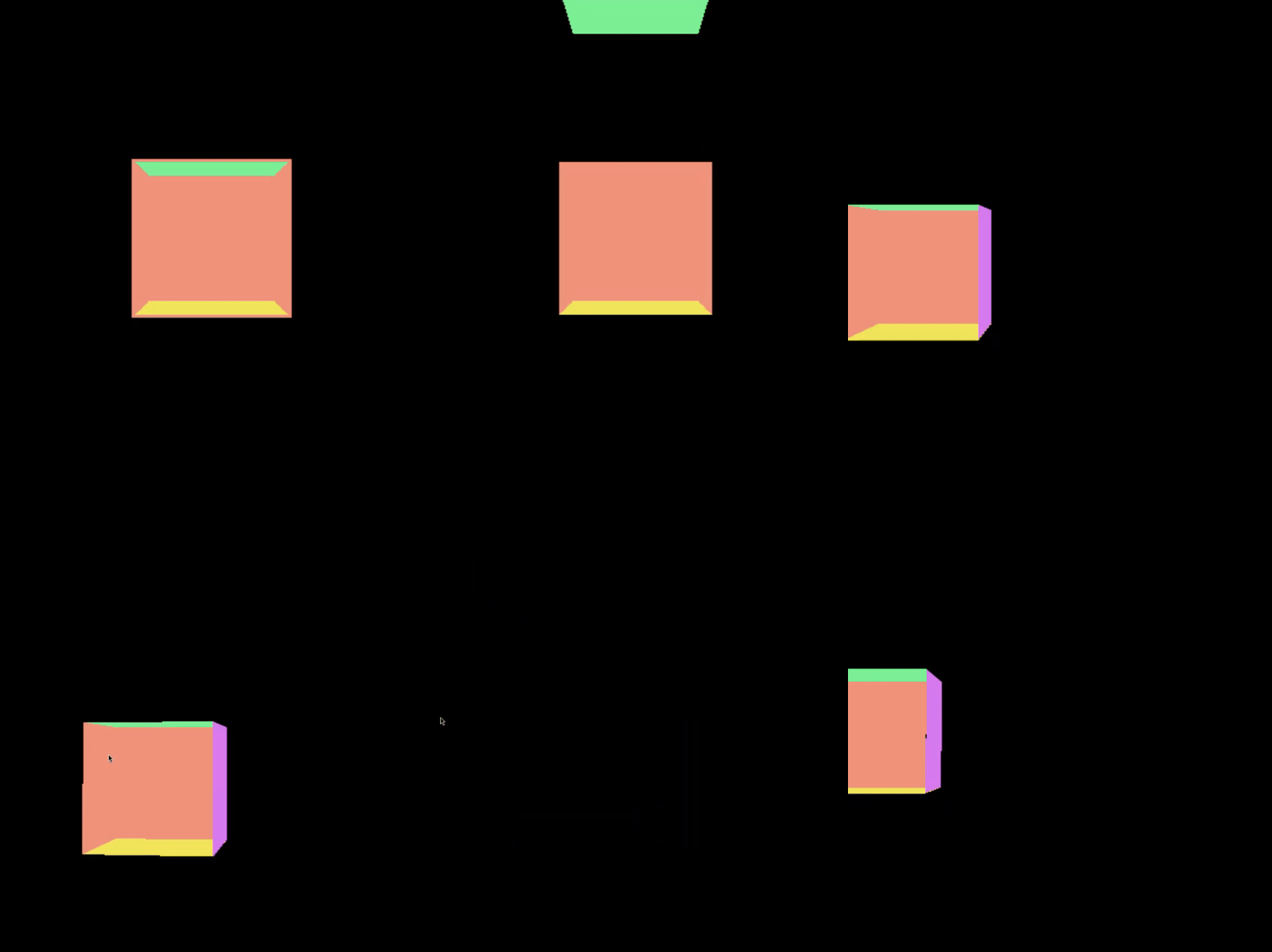
Run this. Six colored faces sit assembled as a cube. Press I and the front face slides outward along its normal. Hold it and it continues to push. Release and it decays back. H/J/K/L/I/O each control one face independently. Multiple keys held simultaneously push multiple faces outward. The Fly preset binds its own camera keys separately; both sets of bindings coexist and do different things.
Tutorial: Mouse position deforming mesh vertices
void compose() {
    auto window = MayaFlux::create_window({ "External", 1200, 800 });

    constexpr int   N    = 24;
    constexpr float SIZE = 2.0f;
    constexpr float STEP = SIZE / static_cast<float>(N - 1);

    std::vector<uint32_t> indices;
    for (int row = 0; row < N - 1; ++row)
        for (int col = 0; col < N - 1; ++col) {
            uint32_t tl = row * N + col;
            indices.insert(indices.end(), { tl, tl+N, tl+1, tl+1, tl+N, tl+N+1 });
        }

    std::vector<MeshVertex> verts(N * N);
    for (int row = 0; row < N; ++row)
        for (int col = 0; col < N; ++col) {
            auto& v   = verts[row * N + col];
            v.position = { col * STEP - SIZE * 0.5f, 0.f, row * STEP - SIZE * 0.5f };
            v.color    = { 0.3f, 0.6f, 0.9f };
            v.normal   = { 0.f, 1.f, 0.f };
            v.tangent  = { 1.f, 0.f, 0.f };
            v.uv       = { float(col)/(N-1), float(row)/(N-1) };
            v.weight   = 0.f;
        }

    auto mesh = vega.MeshWriterNode(N * N) | Graphics;
    mesh->set_mesh(verts, indices);

    auto buf = vega.GeometryBuffer(mesh) | Graphics;
    buf->setup_rendering({ .target_window = window });
    buf->get_render_processor()->set_view_transform(
        Kinesis::look_at_perspective(
            {0.f, 3.f, 3.f}, {0.f, 0.f, 0.f},
            glm::radians(50.f), 1200.f/800.f, 0.1f, 100.f));
    window->show();

    auto mouse_x = std::make_shared<std::atomic<float>>(0.f);
    auto mouse_y = std::make_shared<std::atomic<float>>(0.f);

    MayaFlux::on_mouse_move(window, [mouse_x, mouse_y, window](double x, double y) {
        const auto& ws = window->get_state();
        mouse_x->store(float(x / ws.current_width)  * 2.f - 1.f, std::memory_order_relaxed);
        mouse_y->store(float(y / ws.current_height) * 2.f - 1.f, std::memory_order_relaxed);
    });

    MayaFlux::schedule_metro(1.0 / 60.0, [mesh, verts, mouse_x, mouse_y]() mutable {
        const float mx = mouse_x->load(std::memory_order_relaxed);
        const float my = mouse_y->load(std::memory_order_relaxed);
        for (auto& v : verts) {
            const float dx = v.position.x - mx;
            const float dz = v.position.z - my;
            const float y  = std::exp(-(dx*dx + dz*dz) * 2.5f) * 0.6f;
            v.position.y   = y;
            v.weight       = y / 0.6f;
            v.color        = glm::mix(
                glm::vec3(0.1f, 0.3f, 0.8f),
                glm::vec3(0.9f, 0.7f, 0.2f),
                v.weight);
        }
        mesh->set_mesh_vertices(verts);
    });
}
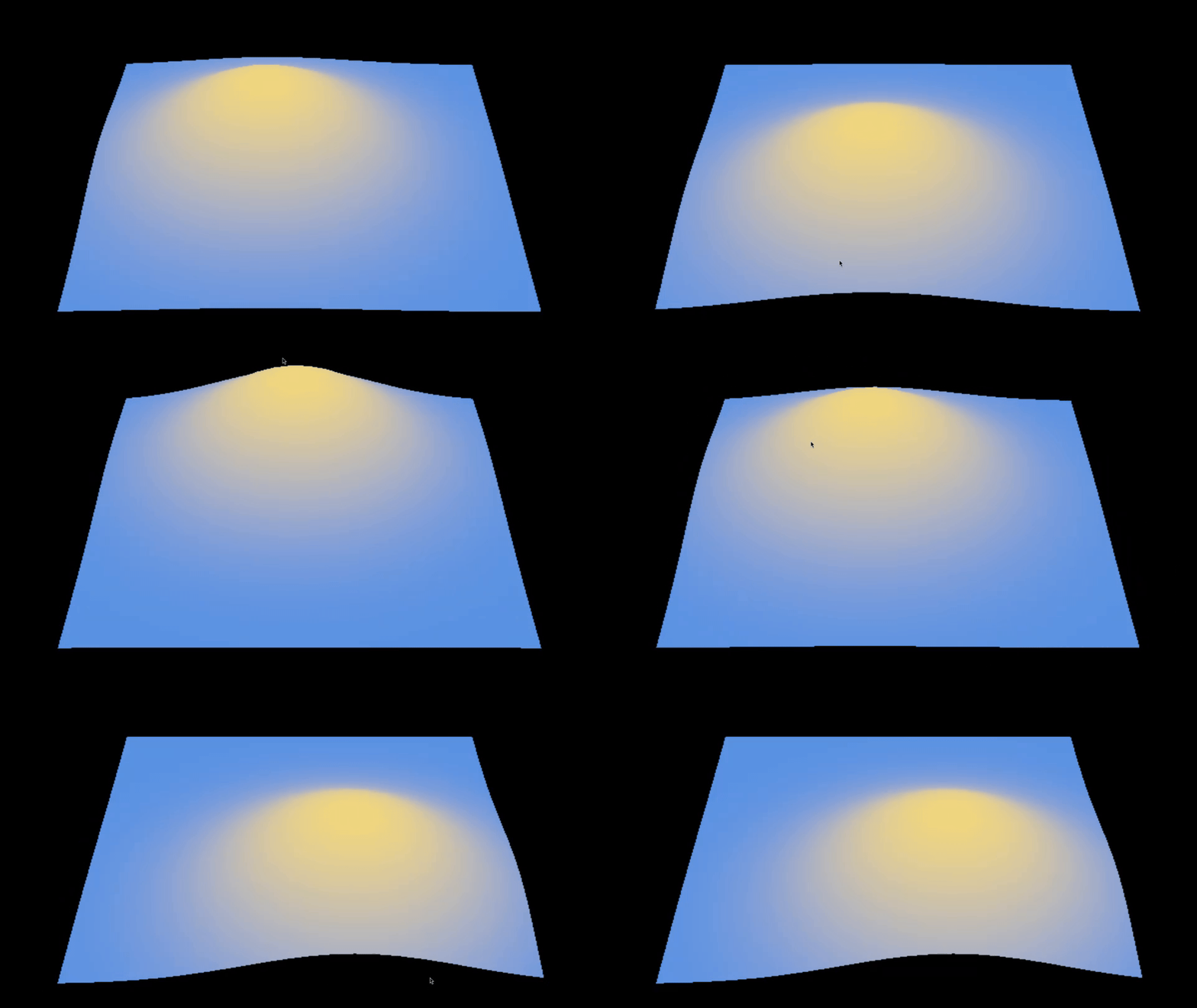
Run this. A flat grid deforms under a Gaussian hill centered on the mouse cursor. Move the
mouse and the hill follows, coloring from blue to gold at the peak. Change 2.5f
in the exponent to 8.0f for a sharper, narrower peak. Change 0.6f
for a taller hill.
Tutorial: OSC driving mesh slot transforms
OSC example with optional internal sender for testing without hardware
// Not needed if you have an actual OSC hardware sending messages to port 9000
void osc_sender() {
    auto sink = make_persistent_shared<Portal::Network::NetworkSink>(
        Portal::Network::StreamConfig {
            .name      = "osc_loopback",
            .endpoint  = { .address = "127.0.0.1", .port = 9000 },
            .profile   = Portal::Network::StreamProfile::REALTIME_SMALL,
            .transport = Portal::Network::NetworkTransportHint::UDP,
        });
    float t = 0.f;
    schedule_metro(0.05, [&t, sink]() {
        if (!sink->is_open()) return;
        float rotate_val = (std::sin(t * 0.4f)  + 1.f) * 0.5f;
        float scale_val  = (std::sin(t * 0.17f) + 1.f) * 0.5f;
        auto r = Portal::Network::serialize_osc("/rotate", {{ rotate_val }});
        auto s = Portal::Network::serialize_osc("/scale",  {{ scale_val  }});
        sink->send({ r.data(), r.size() });
        sink->send({ s.data(), s.size() });
        t += 0.05f;
    }, "osc_loopback_sender");
}

void settings() {
    auto& cfg       = MayaFlux::Config::get_global_stream_info();
    cfg.osc.enabled = true;
    cfg.osc.port    = 9000;
}

void compose() {
    osc_sender(); // ONLY NEEDED if you do not want to use an actual OSC hardware

    auto window = MayaFlux::create_window({ "External", 1200, 800 });

    auto make_tetra = [](glm::vec3 color)
        -> std::pair<std::vector<MeshVertex>, std::vector<uint32_t>>
    {
        std::vector<MeshVertex> v = {
            {{ 0.f,  0.6f, 0.f }, color, 1.f, {0.5f,1.f}, { 0, 1, 0}, {1,0,0}},
            {{-0.5f,-0.3f,-0.5f}, color, 1.f, {0.f, 0.f}, { 0,-1, 0}, {1,0,0}},
            {{ 0.5f,-0.3f,-0.5f}, color, 1.f, {1.f, 0.f}, { 0,-1, 0}, {1,0,0}},
            {{ 0.f, -0.3f, 0.5f}, color, 1.f, {0.5f,0.f}, { 0,-1, 0}, {1,0,0}},
        };
        return { v, { 0,1,2, 0,2,3, 0,3,1, 1,3,2 } };
    };

    auto net = vega.MeshNetwork() | Graphics;

    for (auto [color, tx] : std::array{
             std::pair{ glm::vec3{0.8f,0.3f,0.2f}, -0.8f },
             std::pair{ glm::vec3{0.2f,0.5f,0.9f},  0.8f } })
    {
        auto [verts, indices] = make_tetra(color);
        auto node = std::make_shared<Nodes::GpuSync::MeshWriterNode>(4);
        node->set_mesh(verts, indices);
        net->add_slot("", node);
        net->get_slot(net->slot_count() - 1).local_transform =
            glm::translate(glm::mat4(1.f), {tx, 0.f, 0.f});
    }

    auto buf = vega.MeshNetworkBuffer(net) | Graphics;
    buf->setup_rendering({ .target_window = window });
    buf->get_render_processor()->set_view_transform(
        Kinesis::look_at_perspective(
            {0.f, 2.f, 4.f}, {0.f, 0.f, 0.f},
            glm::radians(45.f), 1200.f/800.f, 0.1f, 100.f));
    window->show();

    auto rotate_ctrl = vega.read_osc(
        OSCConfig::normalized(0.0, 1.0),
        Core::InputBinding::osc("/rotate"));

    auto scale_ctrl = vega.read_osc(
        OSCConfig::normalized(0.0, 1.0),
        Core::InputBinding::osc("/scale"));

    float angle = 0.f;
    MayaFlux::schedule_metro(1.0 / 60.0, [net, rotate_ctrl, scale_ctrl, &angle]() {
        const float speed = static_cast<float>(rotate_ctrl->get_last_output());
        const float scale = 0.4f + static_cast<float>(scale_ctrl->get_last_output()) * 1.2f;
        angle += speed * 0.08f;

        auto& slot_a = net->get_slot(0);
        slot_a.local_transform =
            glm::translate(glm::mat4(1.f), {-0.8f, 0.f, 0.f}) *
            glm::rotate(glm::mat4(1.f), angle, {0.f, 1.f, 0.f});
        slot_a.dirty = true;

        auto& slot_b = net->get_slot(1);
        slot_b.local_transform =
            glm::translate(glm::mat4(1.f), {0.8f, 0.f, 0.f}) *
            glm::scale(glm::mat4(1.f), glm::vec3(scale));
        slot_b.dirty = true;
    });
}
Run this. The left tetrahedron spins at a rate driven by /rotate, the right one
breathes in scale driven by /scale. The loopback sender in osc_sender()
generates both values internally so no external client is needed. Replace it with any OSC sender
targeting port 9000 and the same addresses to control it from a phone, another program, or hardware.
read_osc registers the node internally before returning. No | Audio pipe
is needed. get_last_output() on the graphics metro thread is a lock-free read of an
atomic written by the OSC receive thread.
Card 6: Creative Variations
Click this card to reveal full explanation
The previous cards all react: to clocks, to conditions, to external events. This card generates.
schedule_pattern and line produce values according to computational rules,
not in response to anything. Everything downstream reads from them.
Tutorial: Pattern as a generative sequencer
void compose() {
    auto window = MayaFlux::create_window({ "Time", 1400, 900 });
    window->show();

    // Kick: pitched envelope on a sine
    auto kick_env   = vega.Phasor(0.0f) | Audio[0];
    auto kick_shape = vega.Polynomial([](double x) {
        return std::exp(-x * 18.0);
    }) | Audio[0];
    kick_shape->set_input_node(kick_env);
    auto kick = vega.Sine(55.0f) | Audio[0];
    kick->set_amplitude_modulator(kick_shape);

    // Snare: filtered noise with exponential decay
    auto noise = vega.Random();
    noise->set_amplitude(0.08);
    std::vector<double> b = { 0.0675, 0.0, -0.0675 };
    std::vector<double> a = { 1.0, -1.1430, 0.4128 };
    auto snare_iir = vega.IIR(noise, b, a);
    snare_iir->set_gain(0.15);
    auto snare_shape = vega.Polynomial([](double x) { return std::exp(-x * 30.0); });
    snare_shape->set_input_node(snare_iir);
    auto snare_env = vega.Phasor(0.0f) | Audio[1];
    snare_env->set_amplitude_modulator(snare_shape);
    snare_env->set_frequency_modulator(snare_shape);

    // Hat: high-frequency sine, very short decay
    auto hat_env   = vega.Phasor(0.0f) | Audio[0];
    auto hat_shape = vega.Polynomial([](double x) { return std::exp(-x * 60.0); }) | Audio[0];
    hat_shape->set_input_node(hat_env);
    auto hat = vega.Sine(6000.0f) | Audio[0];
    hat->set_amplitude_modulator(hat_shape);

    // Visual: three geometry layers in one composite buffer
    auto hits       = vega.PointCollectionNode() | Graphics;
    auto connector  = vega.PathGeneratorNode(Kinesis::InterpolationMode::CATMULL_ROM, 16, 64) | Graphics;
    auto sweep_mesh = vega.MeshWriterNode(64) | Graphics;

    {
        std::vector<MeshVertex> v;
        std::vector<uint32_t> idx;
        const int SEGS = 16;
        v.push_back({ {0.f,0.f,0.f}, {0.5f,0.5f,1.f}, 1.f, {}, {0,0,1}, {1,0,0} });
        for (int i = 0; i <= SEGS; ++i) {
            float a = float(i) / SEGS * 2.f * M_PI;
            v.push_back({ {0.35f*std::cos(a), 0.35f*std::sin(a), 0.f},
                          {0.2f,0.6f,0.9f}, 0.f, {}, {0,0,1}, {1,0,0} });
            if (i < SEGS)
                idx.insert(idx.end(), { 0u, uint32_t(i+1), uint32_t(i+2) });
        }
        sweep_mesh->set_mesh(v, idx);
    }

    auto composite = vega.CompositeGeometryBuffer() | Graphics;
    composite->add_geometry("hits",  hits,
        Portal::Graphics::PrimitiveTopology::POINT_LIST,    window);
    composite->add_geometry("path",  connector,
        Portal::Graphics::PrimitiveTopology::LINE_STRIP,    window);
    composite->add_geometry("sweep", sweep_mesh,
        Portal::Graphics::PrimitiveTopology::TRIANGLE_LIST, window);

    struct StepData {
        bool kick, snare, hat;
        float x, y;
        glm::vec3 color;
    };

    float orbit_angle = 0.f;

    MayaFlux::schedule_pattern(
        [](uint64_t step) -> std::any {
            const uint64_t s = step % 8;
            StepData d;
            d.kick  = (s == 0 || s == 3 || s == 6);
            d.snare = (s == 2 || s == 6);
            d.hat   = (s % 2 == 1);
            const float angle = float(step) * 0.37f;
            const float r = 0.5f + 0.2f * std::sin(float(step) * 0.13f);
            d.x = r * std::cos(angle);
            d.y = r * std::sin(angle);
            d.color = {
                std::abs(std::sin(float(step) * 0.11f)),
                std::abs(std::sin(float(step) * 0.07f + 1.f)),
                std::abs(std::sin(float(step) * 0.05f + 2.f)),
            };
            return d;
        },
        [kick_env, snare_env, hat_env,
         hits, connector, sweep_mesh, &orbit_angle](std::any val) {
            const auto& d = std::any_cast<const StepData&>(val);

            if (d.kick)  kick_env->reset();
            if (d.snare) snare_env->reset();
            if (d.hat)   hat_env->reset();

            hits->add_point({ glm::vec3(d.x, d.y, 0.f), d.color, 8.f });
            connector->add_control_point({ glm::vec3(d.x, d.y, 0.f), d.color, 1.5f });

            orbit_angle += d.kick ? 0.4f : 0.08f;
            if (d.kick) {
                auto verts = sweep_mesh->get_mesh_vertices();
                verts[0].color = d.color;
                sweep_mesh->set_mesh_vertices(verts);
            }
        },
        0.125
    );
}
Run this. You hear a Euclidean rhythm: kick on beats 0, 3, 6 of 8; snare on 2 and 6; hat on odd steps. Simultaneously, colored points accumulate at positions computed from the same step index, a Catmull-Rom path connects them, and a triangle fan rotates faster on kick steps. The rhythm and the visual share one source: the pattern function.
Change the step period from 0.125 to 0.0833. Both audio and visual
accelerate together. Change % 8 to % 12. The rhythm changes shape and
so does the visual orbit. The function is the single point of compositional control.
Tutorial: line as a parametric parameter
void compose() {
    auto window = MayaFlux::create_window({ "Time", 1200, 800 });

    auto points = vega.PointCollectionNode() | Graphics;
    auto buf    = vega.GeometryBuffer(points) | Graphics;
    buf->setup_rendering({ .target_window = window });
    window->show();

    auto phasor = vega.Phasor(0.0f) | Audio[0];
    auto env    = vega.Polynomial([](double x) { return std::exp(-x * 20.0); }) | Audio[0];
    env->set_input_node(phasor);
    auto drum   = vega.Sine(110.0f) | Audio[0];
    drum->set_amplitude_modulator(env);

    // Threshold rises from 0.0 to 1.0 over 8 seconds
    MayaFlux::schedule_task("reveal",
        MayaFlux::create_line(0.0f, 1.0f, 8.0f, 128, true));

    MayaFlux::schedule_pattern(
        [](uint64_t step) -> std::any {
            auto is_prime = [](uint64_t n) {
                if (n < 2) return false;
                for (uint64_t i = 2; i * i <= n; ++i)
                    if (n % i == 0) return false;
                return true;
            };
            const float density = is_prime(step % 32) ? 0.9f : 0.3f;
            const float angle   = float(step) * 0.41f;
            const float r       = 0.4f + 0.35f * std::abs(std::sin(float(step) * 0.17f));
            return std::make_tuple(density, r * std::cos(angle), r * std::sin(angle));
        },
        [points, phasor](std::any val) {
            auto [density, x, y] =
                std::any_cast<std::tuple<float, float, float>>(val);

            phasor->reset();

            float* threshold = MayaFlux::get_line_value("reveal");
            if (threshold && density > *threshold) {
                points->add_point({
                    glm::vec3(x, y, 0.f),
                    glm::vec3(density, 1.f - density, 0.3f),
                    6.f + density * 8.f
                });
            }
        },
        0.1
    );
}
Run this. You hear a steady rhythm. The window starts empty. Over eight seconds, points appear progressively: first only the sparse non-prime steps (low density, revealed early), then gradually the prime steps emerge (high density, revealed later). Audio and visual were always computing the same thing; only the threshold determined visibility.
The line is not an event. It does not call anything. get_line_value("reveal")
is a pointer into the coroutine frame advancing on each step. No push, no subscription, no
coordination. The parametric value is ambient state.
Card 7: Declarative Compositions
Every card so far has been imperative. You decide when things run, you hold the state, you
write the callbacks. This card takes a different posture. You describe a flow or a spatial
relationship and the system runs it. You do not call process(). You do not count
cycles. You declare what should happen and step back.
Two systems. BufferPipeline for data flows that span more than one buffer cycle.
Fabric for spatial entities whose position is the only thing audio and graphics
share.
Pipelines: declared data flows
Click this card to reveal full explanation
Tutorial: Live waveshaper, one cycle in one cycle out
void settings() {
    auto& stream = MayaFlux::Config::get_global_stream_info();
    stream.input.enabled  = true;
    stream.input.channels = 1;
}

void compose() {
    auto mic = MayaFlux::create_input_listener_buffer(0, true);

    auto pipeline = MayaFlux::create_buffer_pipeline();
    pipeline->with_strategy(Kriya::ExecutionStrategy::STREAMING);

    pipeline
        >> BufferOperation::capture_from(mic).for_cycles(1)
        >> BufferOperation::modify_buffer(mic,
            [](const std::shared_ptr<Buffers::AudioBuffer>& buf) {
                for (auto& s : buf->get_data()) {
                    s = std::tanh(s * 6.0) * 0.7;
                }
            }).as_streaming();

    pipeline->execute_buffer_rate();
}
Run this with a microphone connected. You hear your input through heavy tanh
saturation. The pipeline captures one buffer cycle from the mic, modifies it in place, and the
modified data leaves through the mic buffer's normal routing. No explicit loop, no cycle
counter, no callback registered on any node.
Change 6.0 to 1.5 and the saturation softens toward gentle clipping.
Change it to 20.0 for hard rectangular clipping. The lambda is the only thing that
changes. The pipeline structure stays identical.
Tutorial: Mouse-painted accumulating looper
void settings() {
    auto& stream = MayaFlux::Config::get_global_stream_info();
    stream.input.enabled  = true;
    stream.input.channels = 1;
}

void compose() {
    auto window = MayaFlux::create_window({ "Looper", 800, 600 });
    window->show();

    auto mic = MayaFlux::create_input_listener_buffer(0, true);

    const uint32_t buf_size = MayaFlux::get_buffer_manager()
        ->get_buffer_size(Buffers::ProcessingToken::AUDIO_BACKEND);
    const uint64_t loop_frames = static_cast<uint64_t>(buf_size) * 64;

    auto loop = std::make_shared<Kakshya::DynamicSoundStream>(48000, 1);
    loop->set_auto_resize(false);
    loop->ensure_capacity(loop_frames);

    auto layer = MayaFlux::create_sampler_from_stream(loop, 0);
    layer->play_continuous(0, layer->slice_from_stream());
    store(layer);

    auto& brush_pos   = make_persistent(0.5f);
    auto& brush_width = make_persistent(0.5f);
    auto& wipe        = make_persistent(false);

    MayaFlux::on_mouse_move(window, [&brush_pos, &brush_width, window]
    (double x, double y) {
        const auto ndc = normalize_coords(x, y, window);
        brush_pos = ndc.x;
        brush_width = 0.05f + 0.6f * ndc.y;
    });

    MayaFlux::on_key_pressed(window, IO::Keys::Space, [&wipe]() { wipe = true; });

    auto pipeline = MayaFlux::create_buffer_pipeline();
    pipeline->with_strategy(Kriya::ExecutionStrategy::PHASED)
             .capture_timing(Vruta::DelayContext::BUFFER_BASED);

    pipeline
        >> BufferOperation::capture_from(mic).for_cycles(64)
        >> BufferOperation::dispatch_to(
            [loop, loop_frames, &brush_pos, &brush_width, &wipe]
            (Kakshya::DataVariant& data, uint32_t) {
                const auto& fresh = std::get<std::vector<double>>(data);

                std::vector<double> existing(loop_frames, 0.0);
                loop->get_channel_frames(existing, 0, 0);

                if (wipe) {
                    wipe = false;
                    std::ranges::fill(existing, 0.0);
                }

                const size_t n = std::min<size_t>(fresh.size(), loop_frames);
                std::vector<double> mixed(loop_frames, 0.0);
                for (size_t i = 0; i < loop_frames; ++i) {
                    const double pos   = static_cast<double>(i) / loop_frames;
                    const double d     = std::abs(pos - brush_pos);
                    const double brush = std::exp(-(d * d) / (brush_width * brush_width));

                    const double keep = 0.98 - 0.5 * brush;
                    const double prev = existing[i] * keep;
                    const double live = (i < n) ? fresh[i] * brush : 0.0;
                    mixed[i] = std::tanh(prev + live);
                }

                loop->write_frames(
                    std::span<const double>(mixed.data(), mixed.size()), 0, 0);
            });

    pipeline->execute_buffer_rate();
}
Run this with a microphone and make some sound. An empty window opens. The loop is a strip of time laid left to right across the window, played back continuously underneath you. Wherever the pointer sits, that region of the loop receives the fresh input painted in while the rest decays. Drag across the window and you smear new sound into the part of the loop the cursor passes over, leaving the rest to fade. Move down for a wider brush, up for a narrow one. Space wipes the loop.
Stop moving and the loop stabilises into whatever you last painted, repeating. Keep painting the same spot and that region thickens toward saturation while the rest thins out. The texture is the record of where your cursor has been.
Fabric: one gesture for sound and light
Click this card to reveal full explanation
Tutorial: Fabric, one gesture for sound and light
Vruta::GraphicsRoutine weave_mode(
    Vruta::TaskScheduler&,
    std::shared_ptr<Nodes::GpuSync::PathGeneratorNode> path,
    std::shared_ptr<Nodes::Network::ModalNetwork> modal,
    size_t mode_index,
    glm::vec3 color) {
    auto& p = co_await Kriya::GetGraphicsPromise{};
    glm::vec3 pos(0.0f);

    while (!p.should_terminate) {
        const auto& modes = modal->get_modes();
        if (mode_index < modes.size()) {
            const float a = static_cast<float>(modes[mode_index].amplitude);
            const float angle = static_cast<float>(mode_index) / modes.size()
                * glm::two_pi<float>();
            const glm::vec3 target(
                std::cos(angle) * (0.3f + a * 2.5f),
                std::sin(angle) * (0.3f + a * 2.5f),
                0.0f);
            pos = glm::mix(pos, target, 0.05f);
            path->add_control_point({ pos, color, 1.0f + a * 4.0f });
        }
        co_await Kriya::FrameDelay { .frames_to_wait = 2 };
    }
}

void compose() {
    auto window = MayaFlux::create_window({ "Gesture", 1200, 800 });
    window->show();

    auto modal = vega.ModalNetwork(8, 110.0,
        Nodes::Network::ModalNetwork::Spectrum::INHARMONIC, 8.0) | Audio[{ 0, 1 }];
    modal->set_coupling_enabled(true);

    auto composite = vega.CompositeGeometryBuffer() | Graphics;

    std::vector<std::shared_ptr<Nodes::GpuSync::PathGeneratorNode>> paths;
    for (size_t i = 0; i < 8; ++i) {
        const glm::vec3 color = glm::mix(
            glm::vec3(0.2f, 0.4f, 0.9f),
            glm::vec3(0.9f, 0.3f, 0.2f),
            static_cast<float>(i) / 7.0f);

        auto path = vega.PathGeneratorNode(
            Kinesis::InterpolationMode::CATMULL_ROM, 4, 256) | Graphics;
        path->add_control_point({ glm::vec3(0.0f), color, 1.0f });
        paths.push_back(path);

        composite->add_geometry("m" + std::to_string(i), path,
            Portal::Graphics::PrimitiveTopology::LINE_STRIP,
            { .target_window   = window,
              .vertex_shader   = "line_lit.vert",
              .fragment_shader = "line_lit.frag",
              .geometry_shader = "line_lit.geom" });
    }

    auto& sched = *MayaFlux::get_scheduler();
    auto& evmgr = *MayaFlux::get_event_manager();
    auto fabric = std::make_shared<Nexus::Fabric>(sched, evmgr);

    for (size_t i = 0; i < 8; ++i) {
        auto driver = std::make_shared<Nexus::Emitter>(
            [](const Nexus::InfluenceContext&) {});
        fabric->wire(driver)
            .use([paths, modal, i](Vruta::TaskScheduler& s) -> Vruta::GraphicsRoutine {
                const glm::vec3 c = glm::mix(
                    glm::vec3(0.2f, 0.4f, 0.9f),
                    glm::vec3(0.9f, 0.3f, 0.2f),
                    static_cast<float>(i) / 7.0f);
                return weave_mode(s, paths[i], modal, i, c);
            })
            .finalise();
    }

    auto cursor = std::make_shared<Nexus::Emitter>(
        [modal](const Nexus::InfluenceContext& ctx) {
            const float t = (ctx.position.x + 1.0f) * 0.5f;
            const float strength = (ctx.position.y + 1.0f) * 0.5f;
            modal->excite_at_position(t, strength * 0.6f);
        });

    cursor->set_position(glm::vec3(0.0f));
    cursor->set_color(glm::vec3(1.0f, 0.9f, 0.7f));
    cursor->set_radius(1.5f);
    for (const auto& proc : composite->get_render_processors()) {
        cursor->set_influence_target(proc);
    }

    fabric->wire(cursor).every(1.0 / 60.0).finalise();

    MayaFlux::on_mouse_move(window, [cursor, window](double x, double y) {
        const auto& ws = window->get_state();
        cursor->set_position(glm::vec3(
            static_cast<float>(x / ws.current_width) * 2.0f - 1.0f,
            1.0f - static_cast<float>(y / ws.current_height) * 2.0f,
            0.0f));
    });

    auto commit_loop = [](Vruta::TaskScheduler&,
                          std::shared_ptr<Nexus::Fabric> fab) -> Vruta::GraphicsRoutine {
        auto& p = co_await Kriya::GetGraphicsPromise {};
        while (!p.should_terminate) {
            fab->commit();
            co_await Kriya::FrameDelay { .frames_to_wait = 1 };
        }
    };

    MayaFlux::schedule_task("gesture_commit",
        commit_loop(sched, fabric), false);
}
Run this and move the mouse across the window. You strike a resonant body. Where the cursor sits decides which modes ring and how hard: horizontal position sweeps which part of the body is struck, vertical position sets how hard. The eight curves are woven from the network's own mode amplitudes, so the louder a mode rings the further its curve reaches out. And the geometry lights up around the cursor, because the same position that strikes the sound also drives the shader.
One Emitter does all of this. Its position is the only input. From that single
position the sound is struck, the curves are shaped by what rings, and the light falls where the
strike lands. Move the cursor and all three move together because they are the same number.
The Floor of the System
Every scheduling primitive in the previous cards is a coroutine underneath:
metro, Timer, EventChain, pattern, line, Trigger, Gate, the pipeline's
internal loop.
This card shows what those look like written directly.
A routine has one advantage no callback has: its body can hold as many waits
as it likes. A whole phrase becomes straight-line code.
Tutorial: Raw Routines
Four Routines, Four Ways of Asking "When"
MayaFlux has one coroutine model with four routine types. They differ in what resumes them:
- SoundRoutine: resumed on the sample clock, on the audio
thread. Suspends with
SampleDelayorBufferDelay. - GraphicsRoutine: resumed on the frame clock, on the
graphics thread. Suspends with
FrameDelay. - CrossRoutine: resumed only when every clock it armed has
reached its target. Suspends with
MultiRateDelay. - FreeRoutine: no clock at all. Resumed when a predicate
you supply returns true. Suspends with
ConditionAwaiter.
Everything scheduled in the earlier cards is one of these with a loop around it. Each card below writes one directly, and each body waits many times, on different durations, in one function.
A Phrase in One Function (SoundRoutine)
Click this card to reveal full explanation
A SoundRoutine is a C++ coroutine function with return type
Vruta::SoundRoutine. co_await GetAudioPromise{}
gives you a reference to the promise that lives in the coroutine frame.
co_await SampleDelay{N} suspends for exactly N samples and
the body carries on from the next line.
The body below is a whole phrase. A steady pulse, a three-note figure with uneven gaps, a fill whose gaps shrink by a fixed ratio, then a rest. Each note is a wait for the gate, then a wait for the remainder. Eight bars on screen jump when their note sounds.
void set_bar(const std::shared_ptr<MeshNetwork>& net, size_t i, float h)
{
    const float x = -0.84f + 0.24f * static_cast<float>(i);
    auto& slot = net->slots()[i];
    slot.local_transform = glm::translate(glm::mat4(1.f), glm::vec3(x, -1.f + h, 0.f))
                                         * glm::scale(glm::mat4(1.f),
                                         glm::vec3(1.f, h, 1.f));
    slot.dirty = true;
}

Vruta::SoundRoutine phrase(
    std::shared_ptr<MeshNetwork> bars,
    std::function<void()> play_kick,
    std::function<void()> play_hat)
{
    auto& promise = co_await GetAudioPromise {};
    promise.set_state("tempo", 1.0f);
    promise.set_state("bar", uint32_t { 0 });

    auto wait = [&](double beats) {
        const float tempo = *promise.get_state<float>("tempo");
        return SampleDelay { seconds_to_samples(0.5 * beats / tempo) };
    };
    auto on = [&](size_t i, const std::function<void()>& play) {
        play();
        set_bar(bars, i, 0.5f);
    };
    auto off = [&](size_t i) { set_bar(bars, i, 0.05f); };

    const double figure[] = { 0.75, 0.75, 0.5 };

    while (true) {
        if (promise.should_terminate)
            break;

        for (size_t i = 0; i < 4; ++i) {
            on(i, play_kick);
            co_await wait(0.15);
            off(i);
            co_await wait(0.85);
        }

        for (size_t i = 0; i < 3; ++i) {
            on(4 + i, play_hat);
            co_await wait(0.1);
            off(4 + i);
            co_await wait(figure[i] - 0.1);
        }

        double gap = 0.5;
        for (size_t i = 0; i < 8; ++i) {
            if (i % 2 == 0)
                on(i, play_kick);
            else
                on(i, play_hat);
            co_await wait(gap * 0.4);
            off(i);
            co_await wait(gap * 0.6);
            gap *= 0.78;
        }

        co_await wait(2.0);

        *promise.get_state<uint32_t>("bar") += 1;
    }
}

void compose()
{
    auto window = create_window({ "Phrase", 1200, 800 });

    auto bars = vega.MeshNetwork() | Graphics;

    const std::vector<uint32_t> quad = { 0, 1, 2, 2, 3, 0 };
    for (size_t i = 0; i < 8; ++i) {
        const glm::vec3 c = glm::mix(
            glm::vec3(.2f, .5f, .9f), glm::vec3(.9f, .4f, .2f),
            static_cast<float>(i) / 7.f);
        const float w = 0.08f;
        std::vector<MeshVertex> v = {
            { { -w, -1.f, 0.f }, c, 1.f, {}, { 0, 0, 1 }, { 1, 0, 0 } },
            { { w, -1.f, 0.f }, c, 1.f, {}, { 0, 0, 1 }, { 1, 0, 0 } },
            { { w, 1.f, 0.f }, c, 1.f, {}, { 0, 0, 1 }, { 1, 0, 0 } },
            { { -w, 1.f, 0.f }, c, 1.f, {}, { 0, 0, 1 }, { 1, 0, 0 } },
        };
        auto node = std::make_shared<MeshWriterNode>(4);
        node->set_mesh(v, quad);
        bars->add_slot("bar" + std::to_string(i), node);
    }
    for (size_t i = 0; i < 8; ++i) {
        set_bar(bars, i, 0.05f);
    }

    auto buf = vega.MeshNetworkBuffer(bars) | Graphics;
    buf->setup_rendering({ .target_window = window });
    window->show();

    auto kick = create_sampler("path/to/kick.wav");
    kick->load(0, kick->slice_from_stream());
    auto hat = create_sampler("path/to/hat.wav");
    hat->load(0, hat->slice_from_stream());

    schedule_task("phrase",
        phrase(bars, [kick] { kick->play(0); }, [hat] { hat->play(0); }));

    on_key_pressed(window, IO::Keys::Space, []() {
        if (auto task = get_scheduler()->get_task("phrase")) {
            if (auto* t = task->get_state<float>("tempo")) {
                *t = std::min(3.0f, *t + 0.1f);
            }
        }
    });

    on_key_pressed(window, IO::Keys::S, []() {
        if (auto task = get_scheduler()->get_task("phrase")) {
            if (auto* t = task->get_state<float>("tempo")) {
                *t = std::max(0.3f, *t - 0.1f);
            }
        }
    });
}
Run this. Four even kicks, one bar lighting per kick. Three hats on bars five to seven with a long-long-short spacing. Eight alternating hits that tighten until they blur. Two beats of silence, and the phrase starts over. Press Space and the whole phrase speeds up, mid-section. Press S and it slows.
Change 0.78 to 0.9 and the fill tightens slowly
instead of collapsing. Change the figure array to
{ 0.5, 0.5, 0.5 } and the uneven spacing goes even. Add a
fifth section by pasting another loop above the rest: nothing else needs
to change.
The body is the score. It reads top to bottom in the order the sound happens. There is no step counter and no branching on "which section am I in". The position in the function is that information.
Drawing a Wavetable (GraphicsRoutine)
Click this card to reveal full explanation
A GraphicsRoutine is structurally identical to a
SoundRoutine. The differences are the clock and the thread.
co_await FrameDelay{N} suspends for N frames of the frame
clock, and the routine resumes on the graphics thread.
This one crosses into sound. The routine computes one cycle of a waveform as 480 numbers. Every frame it writes them into a stream that a sampler loops, and draws them as a curve. The picture is the sound. Its body is a script on the frame clock: glide to a shape, hold it, flutter, rest, move to the next.
constexpr size_t kTable = 480;
constexpr double kTau = 6.283185307179586;

double shape_sine(double x)   { return std::sin(kTau * x); }
double shape_saw(double x)    { return 2.0 * x - 1.0; }
double shape_square(double x) { return x < 0.5 ? 0.8 : -0.8; }
double shape_hollow(double x) {
    return 0.6 * std::sin(kTau * 3.0 * x) + 0.4 * std::sin(kTau * 5.0 * x);
}

GraphicsRoutine scribe(
    std::shared_ptr<Kakshya::DynamicSoundStream> stream,
    std::shared_ptr<::PathGeneratorNode> path)
{
    auto& promise = co_await GetGraphicsPromise{};

    using Shape = double (*)(double);
    const Shape shapes[] = { shape_sine, shape_saw, shape_square, shape_hollow };

    std::vector<double> table(kTable, 0.0);
    std::vector<double> out(kTable, 0.0);

    auto publish = [&](double gain) {
        for (size_t i = 0; i < kTable; ++i) {
            out[i] = table[i] * gain * 0.4;
        }
        stream->write_frames(std::span<const double>(out));

        path->clear_path();
        for (size_t i = 0; i < kTable; i += 5) {
            const float x = -0.9f + 1.8f * static_cast<float>(i) / static_cast<float>(kTable);
            const float y = static_cast<float>(table[i] * gain) * 0.6f;
            path->add_control_point({ glm::vec3(x, y, 0.f), glm::vec3(.4f, .8f, 1.f), 3.f });
        }
    };

    while (true) {
        for (const Shape shape : shapes) {
            if (promise.should_terminate) co_return;

            for (int frame = 0; frame < 90; ++frame) {
                for (size_t i = 0; i < kTable; ++i) {
                    const double target = shape(static_cast<double>(i) / kTable);
                    table[i] += (target - table[i]) * 0.06;
                }
                publish(1.0);
                co_await FrameDelay{ 1 };
            }

            co_await FrameDelay{ 150 };

            for (int k = 0; k < 6; ++k) {
                publish(k % 2 == 0 ? 0.25 : 1.0);
                co_await FrameDelay{ 4 };
            }

            publish(1.0);
            co_await FrameDelay{ 60 };
        }
    }
}

void compose() {
    auto window = create_window({ "Wavetable", 1200, 800 });

    auto path = vega.PathGeneratorNode(
        Kinesis::InterpolationMode::CATMULL_ROM, 4, 128) | Graphics;
    auto buffer = vega.GeometryBuffer(path) | Graphics;
    buffer->setup_rendering({
        .target_window = window,
        .topology = Portal::Graphics::PrimitiveTopology::LINE_STRIP });
    window->show();

    auto stream = std::make_shared<Kakshya::DynamicSoundStream>(48000, 1);
    std::vector<double> seed(kTable);
    for (size_t i = 0; i < kTable; ++i) {
        seed[i] = 0.4 * shape_sine(static_cast<double>(i) / kTable);
    }
    stream->write_frames(std::span<const double>(seed));

    auto layer = create_sampler_from_stream(stream, 0);
    layer->play_continuous(0, layer->slice_from_stream());
    store(layer);

    schedule_task("scribe", scribe(stream, path));
}
Run this. A low hum starts. On screen a curve rises out of a flat line and settles into one sine cycle. Then it slides toward a saw and the hum brightens as the corner sharpens. It holds, flutters in level four times, rests, and moves on to a square, then a hollow two-harmonic shape, then back to the sine.
Change 0.06 to 0.01 and the glide takes seconds:
the timbre slowly opens instead of stepping. Change
FrameDelay{ 1 } in the glide to FrameDelay{ 8 }
and you hear the table update as a zipper, because you have set the update
rate. Change kTable to 240 and the pitch doubles.
The frame clock is writing audio. Nothing in this routine touches the audio thread. It writes numbers into a container, and the audio thread reads that container on its own schedule.
A Score Across Two Clocks (CrossRoutine)
Click this card to reveal full explanation
A SoundRoutine answers to the sample clock and a
GraphicsRoutine answers to the frame clock. A
CrossRoutine answers to both.
co_await MultiRateDelay{ samples, frames } arms the clocks
you give a nonzero count, and the routine resumes only after every armed
clock has reached its target. A zero on one axis disarms that clock for
the suspension.
That gives one body three kinds of wait. Frames only: the code after it
runs on the graphics thread. Samples only: it runs on the audio thread.
Both: it runs when the slower clock arrives. The score below uses all
three. A spiral is drawn one point per frame. A half-second barrier holds
until both clocks have passed it. Then a roll of kicks accelerates on the
sample clock. CrossRoutine has no schedule_task
overload yet, so it is wrapped in a shared_ptr and handed to
the scheduler directly.
void align(cross_promise& promise, TaskScheduler& sched) {
    promise.next_sample.store(
        sched.current_units(ProcessingToken::SAMPLE_ACCURATE),
        std::memory_order_release);
    promise.next_frame.store(
        sched.current_units(ProcessingToken::FRAME_ACCURATE),
        std::memory_order_release);
}

CrossRoutine score(
    TaskScheduler& sched,
    std::shared_ptr<::PathGeneratorNode> path,
    std::function<void()> play_kick)
{
    auto& promise = co_await GetCrossPromise{};

    const double gaps[] = { 0.30, 0.22, 0.16, 0.11, 0.08, 0.06 };

    while (true) {
        if (promise.should_terminate) break;

        align(promise, sched);
        co_await MultiRateDelay{ 0, 1 };

        path->clear_path();
        for (int i = 0; i < 90; ++i) {
            const float t = static_cast<float>(i) / 89.f;
            const float angle = 0.21f * static_cast<float>(i);
            const float radius = 0.06f + 0.009f * static_cast<float>(i);
            path->add_control_point({
                glm::vec3(std::cos(angle) * radius, std::sin(angle) * radius, 0.f),
                glm::mix(glm::vec3(.2f, .6f, 1.f), glm::vec3(1.f, .4f, .3f), t),
                2.f + 3.f * t });
            co_await MultiRateDelay{ 0, 1 };
        }

        align(promise, sched);
        co_await MultiRateDelay{ seconds_to_samples(0.5), 30 };

        align(promise, sched);
        co_await MultiRateDelay{ 1, 0 };

        for (const double gap : gaps) {
            play_kick();
            co_await MultiRateDelay{ seconds_to_samples(gap), 0 };
        }
    }
}

void compose() {
    auto window = create_window({ "Score", 1200, 800 });

    auto path = vega.PathGeneratorNode(
        Kinesis::InterpolationMode::CATMULL_ROM, 6, 60) | Graphics;
    auto buffer = vega.GeometryBuffer(path) | Graphics;
    buffer->setup_rendering({
        .target_window = window,
        .topology = Portal::Graphics::PrimitiveTopology::LINE_STRIP });
    window->show();

    auto kick = create_sampler("path/to/kick.wav");
    kick->load(0, kick->slice_from_stream());

    auto routine = std::make_shared<CrossRoutine>(
        score(*get_scheduler(), path, [kick] { kick->play(0); }));
    get_scheduler()->add_task(routine, "score");
}
Run this. A spiral unwinds from the centre, one point per frame, blue shifting to orange. Only the newest sixty points survive, so the curve is a comet that chases its own tail. When the last point lands there is half a second of nothing. Then six kicks arrive with shrinking gaps, 300 ms down to 60 ms, and the spiral starts over.
Change the 30 in the barrier to 60 and the rest
doubles: the frame clock is now the slower of the two. Change
seconds_to_samples(0.5) to seconds_to_samples(2.0)
and the sample clock governs instead. Delete the two
align calls before the roll and the kicks bunch together into
one burst.
This routine hops threads by choosing its waits. The spiral points are added on the graphics thread and the kicks are fired on the audio thread, from one function, with no queue between them.
Life Off the Clocks (FreeRoutine)
Click this card to reveal full explanation
A FreeRoutine has no clock. It suspends on
co_await ConditionAwaiter{ predicate } and a dedicated
scheduler thread evaluates the predicate over and over. The moment it
returns true, the routine resumes on that thread.
That makes it the place for computation whose pace comes from something other than time. Here it steps Conway's Game of Life on a 48 by 48 grid. Its body waits three times, on three different conditions: not paused, asked for a step, and, if the world has died, told to reseed. A graphics routine draws each generation and asks for the next.
constexpr int kSide = 48;
using Grid = std::array<uint8_t, kSide * kSide>;

struct Life {
    std::array<Grid, 2>   grid {};
    std::atomic<int>      front { 0 };
    std::atomic<bool>     want { false };
    std::atomic<bool>     paused { false };
    std::atomic<bool>     reseed { false };
    std::atomic<uint64_t> generation { 0 };
};

uint32_t randomize(Grid& g, std::mt19937& rng) {
    uint32_t alive = 0;
    for (auto& c : g) {
        c = (rng() % 4) == 0;
        alive += c;
    }
    return alive;
}

uint32_t step(const Grid& in, Grid& out) {
    uint32_t alive = 0;
    for (int y = 0; y < kSide; ++y) {
        for (int x = 0; x < kSide; ++x) {
            int n = 0;
            for (int dy = -1; dy <= 1; ++dy) {
                for (int dx = -1; dx <= 1; ++dx) {
                    if (dx != 0 || dy != 0) {
                        n += in[((y + dy + kSide) % kSide) * kSide + (x + dx + kSide) % kSide];
                    }
                }
            }
            const uint8_t next = in[y * kSide + x] ? (n == 2 || n == 3) : (n == 3);
            out[y * kSide + x] = next;
            alive += next;
        }
    }
    return alive;
}

FreeRoutine evolve(std::shared_ptr<Life> life) {
    std::mt19937 rng(7);

    while (true) {
        co_await ConditionAwaiter{ [life] {
            return !life->paused.load(std::memory_order_acquire);
        } };

        co_await ConditionAwaiter{ [life] {
            return life->want.load(std::memory_order_acquire);
        } };

        const int f = life->front.load(std::memory_order_relaxed);
        uint32_t alive = step(life->grid[f], life->grid[1 - f]);

        if (alive == 0) {
            co_await ConditionAwaiter{ [life] {
                return life->reseed.load(std::memory_order_acquire);
            } };
        }
        if (life->reseed.exchange(false, std::memory_order_acq_rel)) {
            alive = randomize(life->grid[1 - f], rng);
        }

        life->front.store(1 - f, std::memory_order_release);
        life->generation.fetch_add(1, std::memory_order_release);
        life->want.store(false, std::memory_order_release);
    }
}

GraphicsRoutine show(std::shared_ptr<Life> life, auto points) {
    auto& promise = co_await GetGraphicsPromise{};
    uint64_t seen = ~uint64_t { 0 };

    while (true) {
        if (promise.should_terminate) break;

        const uint64_t g = life->generation.load(std::memory_order_acquire);
        if (g != seen) {
            seen = g;
            const Grid& cells = life->grid[life->front.load(std::memory_order_acquire)];

            points->clear_points();
            for (int y = 0; y < kSide; ++y) {
                for (int x = 0; x < kSide; ++x) {
                    if (!cells[y * kSide + x]) continue;
                    points->add_point({
                        glm::vec3(-0.95f + 1.9f * static_cast<float>(x) / (kSide - 1),
                                  -0.95f + 1.9f * static_cast<float>(y) / (kSide - 1), 0.f),
                        glm::vec3(.4f, 1.f, .6f),
                        6.f });
                }
            }

            life->want.store(true, std::memory_order_release);
        }

        co_await FrameDelay{ 3 };
    }
}

void compose() {
    auto window = create_window({ "Life", 1000, 1000 });

    auto points = vega.PointCollectionNode() | Graphics;
    auto buffer = vega.GeometryBuffer(points) | Graphics;
    buffer->setup_rendering({ .target_window = window });
    window->show();

    auto life = std::make_shared<Life>();
    std::mt19937 seed(1);
    randomize(life->grid[0], seed);

    schedule_task("life", evolve(life));
    schedule_task("life_view", show(life, points));

    on_key_pressed(window, IO::Keys::Space, [life]() {
        life->paused.store(!life->paused.load());
    });

    on_key_pressed(window, IO::Keys::R, [life]() {
        life->reseed.store(true);
    });
}
Run this. A field of green cells churns and settles into blinkers, blocks and gliders, about twenty generations a second. Space freezes it and releases it. R scatters a new random world over the current one.
Change FrameDelay{ 3 } to FrameDelay{ 1 } and it
runs at frame rate. Change rng() % 4 to rng() % 2
and the world starts crowded and dies back. Change kSide to
128 and the routine does sixteen thousand cells per step on a
thread that neither clock owns.
The step ran on a third thread. The graphics routine asked and read. The audio thread never knew.
What You've Learned
- Many waits, one body: a routine holds as many waits as it likes, and loops, branches and locals carry the state a callback would need a state machine for.
- SoundRoutine: sample clock, audio thread.
SampleDelay,BufferDelay. State in the promise map. - GraphicsRoutine: frame clock, graphics thread.
FrameDelay. It can write data the audio thread reads, through a container that owns its synchronisation. - CrossRoutine: both clocks, all armed clocks satisfied, one thread resumes. Arming frames only lands you on the graphics thread, samples only on the audio thread. Re-align the clocks when you switch axes.
- FreeRoutine: no clock, a predicate,
ConditionAwaiter, a dedicated spinning thread. Different predicates in sequence. - schedule_task: registers a Sound, Graphics or Free routine by name. Cross routines go through the scheduler directly for now.
- Inputs are parameters: coroutine frames copy parameters and do not own lambda captures.
- Everything earlier is built from these. Metro, Timer, sequence, Trigger, line, and Fabric's wiring are loops over the delays above.
Quick Reference
Pick the highest-level mechanism whose shape fits. Drop a layer only when
its shape is in your way.
The time-based entries below are routines with a loop around them. The node
hooks are callbacks inside a node's own processing.
Time on the sample clock
- When you need code to run at a fixed interval:
schedule_metro. When the interval has to be computed at each step, or the body needs more than one wait: aSoundRoutinewithSampleDelay. - When you need code to run once after a delay:
Kriya::Timer. It holds one pending callback, and scheduling again replaces it. - When you need a bracketed start and end over a duration:
Kriya::TimedAction. The start function runs at once and the end function runs after the duration. - When you need a node to exist for a bounded duration:
node >> Time(N) | Audio. - When you need a finite ordered sequence of timed events:
schedule_sequenceorEventChain. - When you need an indefinitely repeating generative sequence:
schedule_pattern. - When you need a continuously drifting scalar readable by any code:
schedule_taskwithcreate_line, read viaget_line_value.
Signals inside nodes
- When you need code to run on every sample from a specific node:
node->on_tick, oron_tick_ifto add a condition. The callback runs inside the node's per-sample processing, so anything slow in it is paid on every sample. Use sparingly. - When you need code to run only at a specific moment in a node's cycle:
impulse->on_impulse,phasor->on_phase_wrap,phasor->on_threshold,counter->on_count. - When you need code to run while a signal condition is true, continuously:
Logic
while_true. - When you need code to run exactly once at a state transition: Logic
on_change_to.
External input
- When you need to react to keyboard or mouse:
on_key_pressed,on_mouse_move,on_mouse_pressed. These run on the event thread, not the audio thread, so share values accordingly (see below). - When you need to react to MIDI, OSC, or HID:
vega.read_midi/vega.read_osc/vega.read_hid, then hook on the node.
Buffers and space
- When you need audio processing to accumulate across multiple buffer cycles
before acting:
BufferPipelinewithPHASED. - When you need audio processing to apply per cycle with minimal latency:
BufferPipelinewithSTREAMING. - When you need a spatial entity that fires on an interval, a key, or a
choreographed path:
FabricwithWiring.
Raw routines
- When you need complete control of the coroutine and its state, several waits
in one body, or delays computed at the moment they are reached: a
SoundRoutine. - When you need work at frame rate, or a routine that writes data the audio
thread reads: a
GraphicsRoutinewithFrameDelay. - When you need one script that spans both clocks: a
CrossRoutinewithMultiRateDelay. Wait on frames only to run on the graphics thread, on samples only to run on the audio thread, on both to hold until the slower clock arrives. Use thealignhelper from Card 8c whenever you change axes. - When you need computation whose pace is a condition and not a clock: a
FreeRoutinewithConditionAwaiter. It costs one spinning thread, so keep the predicate cheap. - When you need to register one:
schedule_tasktakes a Sound, Graphics or Free routine. A Cross routine goes to the scheduler'sadd_taskfor now.
Sharing values between mechanisms
Decide by thread, not by domain. A key handler and an audio routine are on different threads even though both are control.
- When only one routine touches the value: a local variable in the coroutine.
- When outside code needs to read or nudge one routine's state: promise state through the task handle. Write through existing keys only, and create every key inside the coroutine before its first wait.
- When two mechanisms on different threads (audio, graphics, event, free) need
a value:
std::atomic<T>for one number, ashared_ptr-owned struct of atomics for several, published with a generation counter. For sample data, a container that owns its own synchronisation, such asDynamicSoundStream. - When the audio thread is one of the two: no mutex, ever.
What This Tutorial Does Not Cover
Three areas sit next to everything here and each needs its own document. Each is another answer to the question this tutorial has asked from the start: what does this code wait for?
Lila and live temporal control. Lila is a JIT environment
where you can rewrite a coroutine, replace a pattern function, or swap an
Emitter's influence function while the piece is running. It is not a different
scheduling mechanism. It is the same mechanisms with the
compose() boundary removed. The constraint this tutorial assumed,
that temporal structure is declared at startup and then runs, no longer holds.
A running coroutine is not edited in place. You cancel it and schedule its
replacement under the same name, and the new frame starts with fresh state,
promise map included. Three rules from Card 8 stop being advice there. A
routine takes its inputs as parameters, because the snippet that created it
returns before the routine's next resume. A cross routine added mid-session
aligns its clocks first. A free routine whose first predicate is already true
runs on the thread that evaluated the snippet.
Yantra and completion time. ComputeMatrix and the
granular workflow run computation on background threads and deliver results
through callbacks. The callback is a temporal event of its own: it fires when
the computation finishes. That is a third axis beside the sample clock and the
frame clock, and unlike them it has no rate. Completion time is
nondeterministic, and nothing bounds it unless you add a bound, so a design
that installs a result decides in advance what happens when the result is late.
Installing it into a live pipeline uses what you have already met. Publish it
through a generation counter, as Card 8d does, or cancel a routine and schedule
a new one that carries the result. restart_task alone will not do
it, because it does not rewind the coroutine. A FreeRoutine is the
in-tutorial relative: a computation with no clock whose result appears when it
appears.
Nexus and spatial triggers. A Sensor's perception
function fires on what lies within its query radius at commit()
time. The trigger is spatial, not temporal. It combines with everything here: a
Sensor that fires only inside a Logic gate's open window, a pattern that emits
new Emitter positions, a coroutine that reads Sensor output and drives a
Physics operator. The spatial index itself belongs to the Nexus series. The
scheduling underneath is what you have used throughout: Fabric's
.use(...) runs the same routines you wrote in Card 8, and
registers and cancels them with the entity.
Every mechanism in this tutorial waits on something: a sample count, a frame count, both, a condition. The three areas above add three more ways for a routine to be told to go: someone rewrites it, a computation finishes, an entity arrives. The routines themselves do not change.